 PiP Booster
Add to Chrome
PiP Booster
Add to Chrome
PiP Booster
Add to Chrome
PiP Booster
Add to Chrome
Pop YouTube, Netflix and Facebook Reels into a floating player that stays on top of every app. Captions stay visible. Controls stay real.
PiP Boosterdrag me[ live demo ] click the video, try next, speed and size.
[ the problem ]
The built-in floating window shows the video frame only. YouTube captions and Netflix subtitles stay behind in the tab.
No seek, no speed, no proper volume. Painful on lectures, tutorials and long episodes.
Switch tabs to skip, go back to find your place, scroll past sponsored reels again.
[ how it works ]
Install PiP Booster from the Chrome Web Store. No sign-up.
On YouTube, Netflix or Facebook, two small buttons appear on the player.
Click PiP for a floating window, or the screen icon for cinema mode. Turn on subtitles as usual.
YouTube captions and Netflix subtitles appear right inside the floating window, line by line, in the language you picked. Nothing to set up. A PRO feature, with a 2-minute preview every time on the free plan.
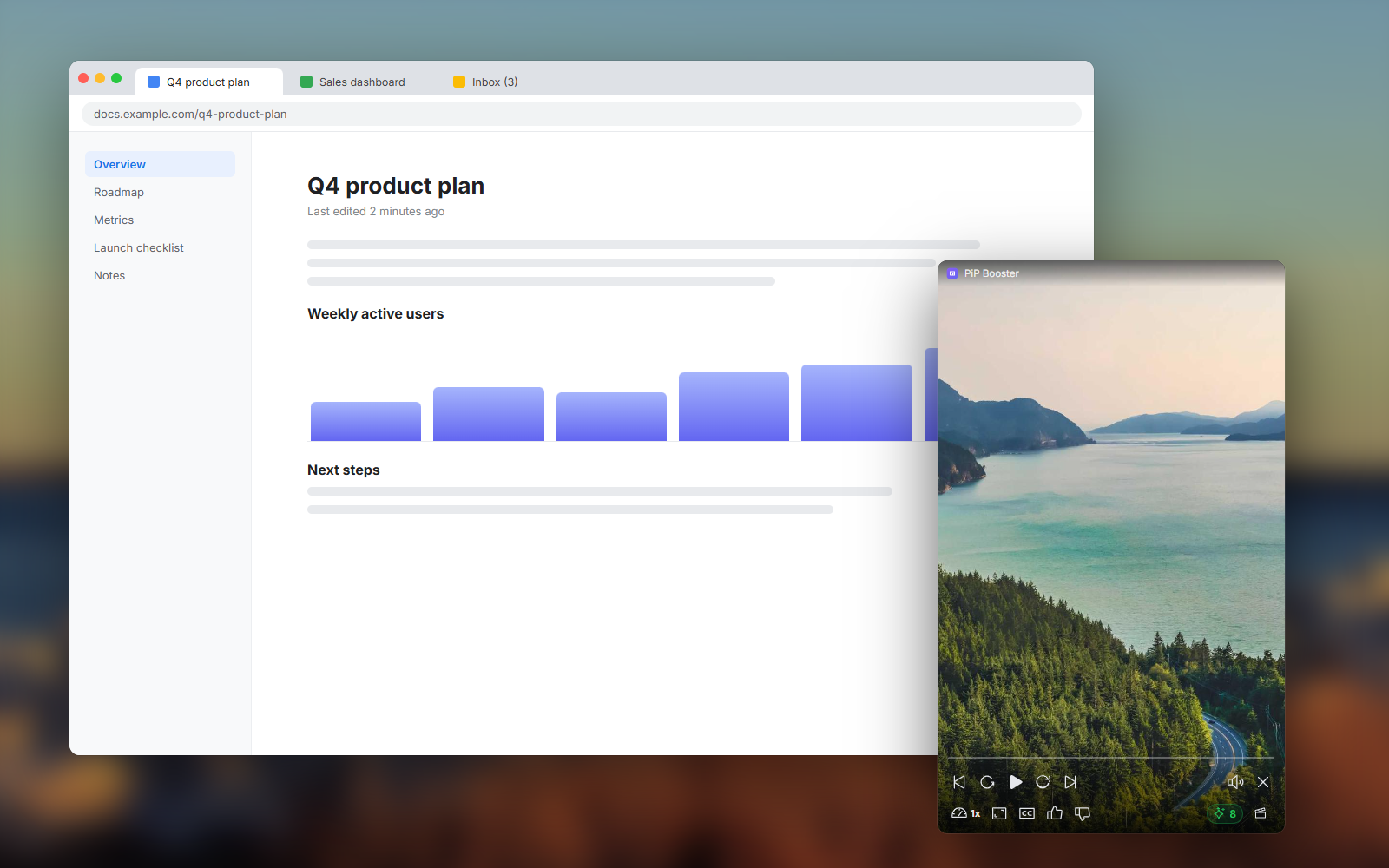
Built on Chrome's Document Picture-in-Picture: move it, resize it, keep it over your docs, code or spreadsheet while you work. PRO remembers the size you like for each site.

Click to pause, ±10s, 0.5x–3x speed, volume, next and previous video. In the window and in cinema mode.
One shortcut pauses everything, closes the player and minimizes Chrome. Customizable, ⌥Q on Mac.
[ made for each site ]
Free
PRO
Free
PRO
Free
PRO
Everything runs in your browser. Videos, subtitles and page content never leave it.
Not happy with PRO? Ask within 14 days for a full refund.
No subscription. One license, up to 3 browsers, all future PRO updates.
[ pricing ]
Chrome Web Store · No sign-up
Every install includes a free 24-hour PRO trial · Secure checkout by Polar · 14-day money-back guarantee
[ faq ]
YouTube (videos and Shorts), Netflix and Facebook Reels, in Chrome on Windows, macOS and Linux.
Turn on subtitles on the site as usual (the CC button on YouTube, the subtitle menu on Netflix), then click the PiP button. PiP Booster copies each line into the floating window as it appears. This is a PRO feature; on the free plan you get a 2-minute preview each time you open the window.
Yes. The video plays in the floating window at the same quality as in the tab. Picking an episode from the list, subtitle and audio language, skipping the intro and going to the next episode are free; showing Netflix subtitles inside the floating window and skipping intros automatically are PRO. Nothing is recorded or downloaded.
Yes. The floating window, cinema mode, all playback controls, the viral score and everything the site already offers (on YouTube: caption language, chapters, quality, loop; on Netflix: subtitle and audio language, skip intro) are free forever. PRO adds what we built on top: subtitles inside the floating window (with a 2-minute free preview each time), automatic intro skipping, skipping YouTube sponsor segments, A-B loop, speed remembered per channel, window size memory, auto-play next, skipping boring and sponsored reels, next-part links and the movie finder.
Yes. Every new install gets all PRO features free for 24 hours. No sign-up, no card. After that, the free features keep working.
After checkout you get a license key by email. Open the PiP Booster popup in Chrome, paste the key and click Activate. One license works on up to 3 browsers.
Yes. Chrome 116 or newer on Windows, macOS and Linux.
No. Videos, subtitles and page content are processed locally and never leave your browser. The only lookup is the optional sponsor-segment check on YouTube (PRO), which sends a 4-character hash, not the video ID. Read the privacy policy.
Request a refund within 14 days and you get your money back in full. See the refund policy.
Add PiP Booster to Chrome in seconds. Free.
Add to Chrome — Free